Collect Google
Maps reviews.
Export a CSV.

Collect Google Maps reviews for the businesses you choose, with available review text, ratings, and owner responses. Browse your collection in GTME or export a CSV for your own research.

One free pack per account. No card or search subscription required. Reviews uses a separate balance from Business Search.

New Reviews collections are temporarily paused. Your Reviews workspace and existing CSV exports remain available. See availability.

Reviews availability.

New Reviews collections are temporarily paused. Existing Reviews results and CSV exports remain available. Business Search remains available.

Updated . New Reviews collections are temporarily paused. Claiming free Reviews or buying a pack does not resume collection.

Open your Reviews workspace

See Reviews in action.

Choose businesses, set your limits, and explore the reviews you collect. This is the actual GTME workspace.

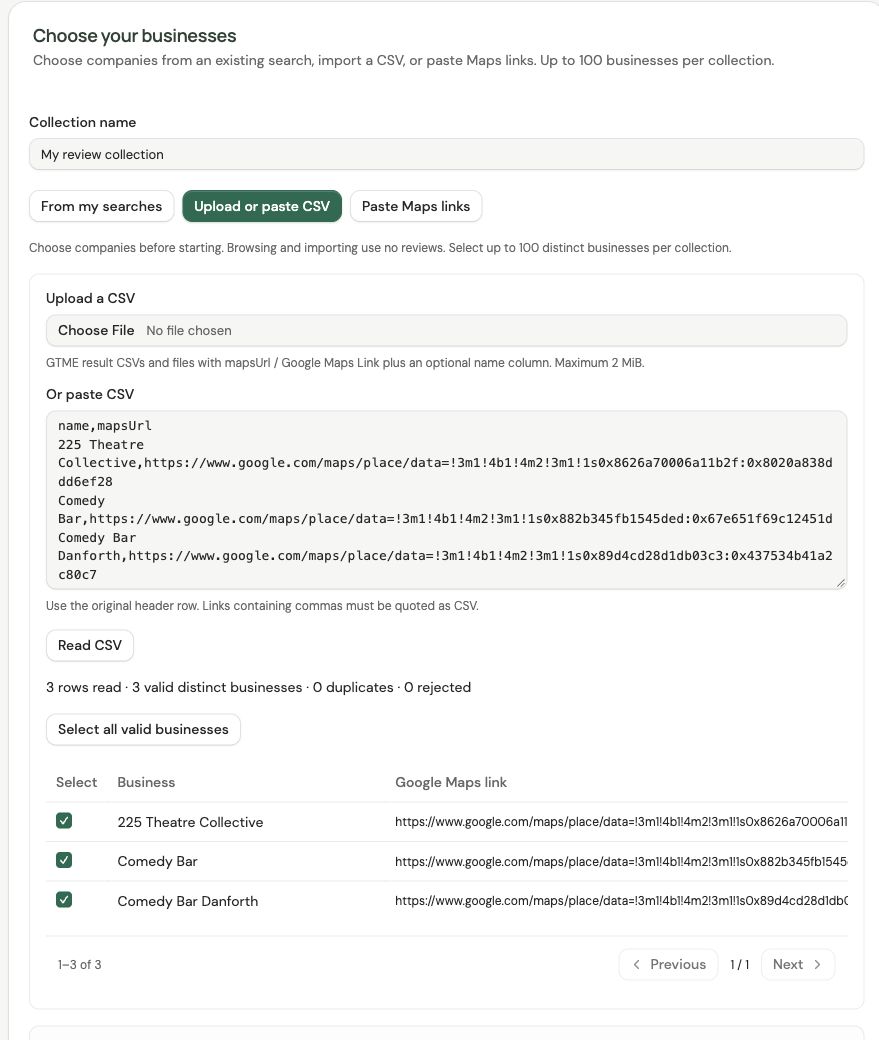
Actual GTME Reviews CSV import with three valid public businesses selected: 225 Theatre Collective, Comedy Bar and Comedy Bar Danforth.

Choose the businesses you need.

Use a finished search, import a CSV, or paste Google Maps place links.

Actual app screens from an earlier example collection. New Reviews collections are temporarily paused; existing results and exports remain available.

The reviews.
In a useful CSV.

Keep the business link and collected review details together. The 10-column export opens in a spreadsheet and gives your own research or analysis a consistent starting format.

Optional fields stay empty when the source does not supply them. Relative dates remain source text, and some businesses deliver fewer reviews than your selected maximum.

Review CSV: all 10 columns
ColumnWhat it contains
BusinessBusiness name, when available.
Google Maps URLThe Maps place link for the business.
Review IDThe identifier used for the collected review.
AuthorReviewer name, when supplied.
RatingThe review’s star rating, when supplied.
ReviewCustomer review text, when supplied.
Posted (source text)The relative posting date as shown by the source.
Published atAn exact publication timestamp, when supplied.
Owner responseThe business owner’s reply, when supplied.
Collected atWhen GTME collected the record.

Collect in bulk.
Set your own limits.

Bring multiple businesses into one collection. Choose the places, the maximum, and the sort order before work starts.

  1. Choose your sources

    Use an existing GTME search, import a CSV, or paste expanded Google Maps place links. Choose up to 100 businesses per collection.

  2. Set your maximum

    Choose up to 1,000 reviews per business and sort by newest or most relevant. GTME reserves the maximum from your Review balance.

  3. Keep what you collect

    Only unique reviews delivered use your balance. Unused reservations return while their pack is valid. Stop a running collection and keep completed results.

Customer feedback.
For the work you do.

Collect the data in GTME, then bring your own expertise to the next step.

Account research for sales

Add customer-review context to selected accounts before a relevant conversation. Keep your qualification, contact research, and outreach in your own workflow.

Explore the sales workflow

Reviews for your own tools

Use a scoped REST key from your HTTP-capable scripts or agents to estimate a collection, submit within explicit limits, follow progress, and export JSON or CSV.

Explore the account API

Need a list of businesses first? See Business Search. Compare both products on the pricing page.

Add Reviews when you need them.

Review packs have their own balance, separate from searches. No monthly membership or search subscription is needed.

New Reviews collections are temporarily paused. Claiming free Reviews or buying a pack does not resume collection. See availability.

50,000 reviews

$99 USD · one time

Approx. $1.98 per 1,000 reviews

Buy this pack
≈20% savings

500,000 reviews

$799 USD · one time

Approx. $1.60 per 1,000 reviews

Buy this pack
≈50% savings

3,000,000 reviews

$2,999 USD · one time

Approx. $1.00 per 1,000 reviews

Buy this pack

Compared with 50,000 reviews for $99: 500,000 reviews save 19.3%; 3,000,000 reviews save 49.5%. Savings are approximate; pack prices are as shown.

Paid packs expire 90 days after payment. Each purchase keeps its own expiry; a new pack does not extend an older one. Collected results and CSVs remain available afterward. Stripe shows the final amount and any taxes before payment.

Start with 100 free reviews.

New Reviews collections are temporarily paused. Your Reviews workspace and existing CSV exports remain available.

Open Reviews

Questions about collecting reviews

Are new Reviews collections available now?
New Reviews collections are temporarily paused. Existing Reviews results and CSV exports remain available. Business Search remains available.
Can I export Google Maps reviews to CSV?
Yes. Collect available reviews for selected businesses, browse the delivered records in GTME, and download the collection as a 10-column CSV. Review text, ratings, author details, posting information, and owner responses depend on source availability. You can open the CSV in a spreadsheet or use it in your own analysis tools.
Can I collect reviews for multiple businesses at once?
Yes. Choose up to 100 businesses per collection and a maximum of up to 1,000 reviews per business. Use a finished GTME search, import a supported CSV, or paste expanded Google Maps place links. Choose newest or most relevant order before confirming the maximum reservation.
Do I need a Business Search subscription?
No. Reviews has its own balance and one-time packs. New accounts can claim 100 free reviews once, with no card or search subscription required. You can supply your own supported Maps links or CSV without running a new business search.
What uses my Review balance?
Only unique reviews delivered to a collection use its reservation. Unused reserved reviews return while the original pack is valid. Collecting the same business in a later collection is a new metered request. Search allowances and Review balances remain separate.
Will I receive every review for each business?
A maximum is a collection limit, not a guaranteed count or a promise of every review. Some businesses return fewer reviews, and source fields can be missing. Relative posting dates stay as source text; GTME does not invent exact timestamps or owner responses.
Can my scripts collect and export Reviews through an API?
Yes. Your own HTTP-capable scripts or agents can use a scoped account API key with reviews:read and reviews:write. New keys start with Maps/account scopes; you add Reviews permission in the browser. Per-job and UTC-day limits apply, and the API shares your separate Review balance and collection history with the web app. Export owned results as JSON or CSV.
Does GTME analyze feedback or provide reputation services?
GTME provides review collection and exports. Your team reads or analyzes the feedback in its own tools and supplies any outreach, advice, or reputation service. Sentiment analysis, reply publishing, and review removal are not included.